
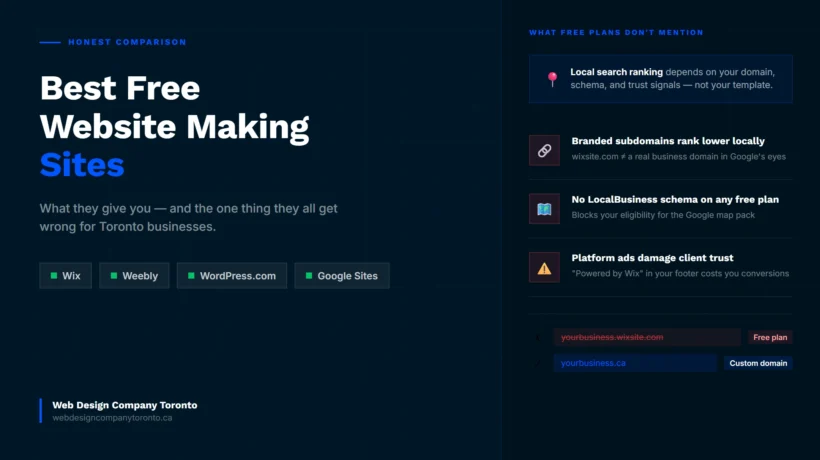
The best free website making sites can help you launch a professional website without spending a dollar. But with so many options available, choosing the right platform is not always as simple as it seems.
Some builders focus on ease of use, while others offer more design flexibility, better SEO tools, or room to grow as your website expands. What works for a personal blog may not be the best choice for a small business in Toronto.
In this honest comparison, we’ll break down the top free website builders in 2026, highlighting their strengths, limitations, and who they are best suited for, so you can make the right choice from the start.
If you’d rather skip templates entirely and prompt your way to a first draft, AI tools like Wix ADI and Lovable can also build website with ai — we cover what they get right and what they still miss in a separate guide.
TLDR The best free website making sites for small businesses include Wix, Weebly, and WordPress.com. Wix offers the most features, Weebly is easy to use, and WordPress.com is a strong option for blogs. While these platforms let you launch a website at no cost, free plans use branded web addresses instead of your own domain name. This can make it harder to build trust and attract local customers through Google. If online visibility matters, a custom domain is worth the investment.
What Makes a Free Website Builder Actually Useful for a Toronto Business?
Choose any article about the best website making sites free of charge and you will see the same four things rated: ease of use, template quality, design flexibility, and upgrade cost. Those things matter. But they do not tell you what a Toronto service business actually needs to know.
Here are the four questions that actually separate “online” from “findable.”
Question 1: Does the free plan let you use a custom domain?
Almost none of them do. This is the single most important factor for local search. A custom .ca domain tells Google your business is real, local, and established. A wixsite.com address tells Google you are still figuring things out.
Question 2: Can you edit your meta titles, descriptions, and URL slugs?
These are the basics of on-page SEO. If the free plan locks them, you cannot tell Google what your pages are about. You are invisible by default.
Question 3: How fast does the site load on mobile?
Google watches how people behave on your site. When mobile pages load slowly, visitors leave. That signals to Google that your site is not worth showing. A sluggish free builder does not just frustrate visitors. It pushes you down the rankings.
Question 4: Can you add a Google Map and a contact form on the free plan?
For a Toronto plumber, trainer, consultant, or notary, these two things are the minimum a homepage needs to do its job. If the free tier hides them behind a paywall, the site is not useful yet.
Wix — Best Free Website Making Site for Most Small Businesses
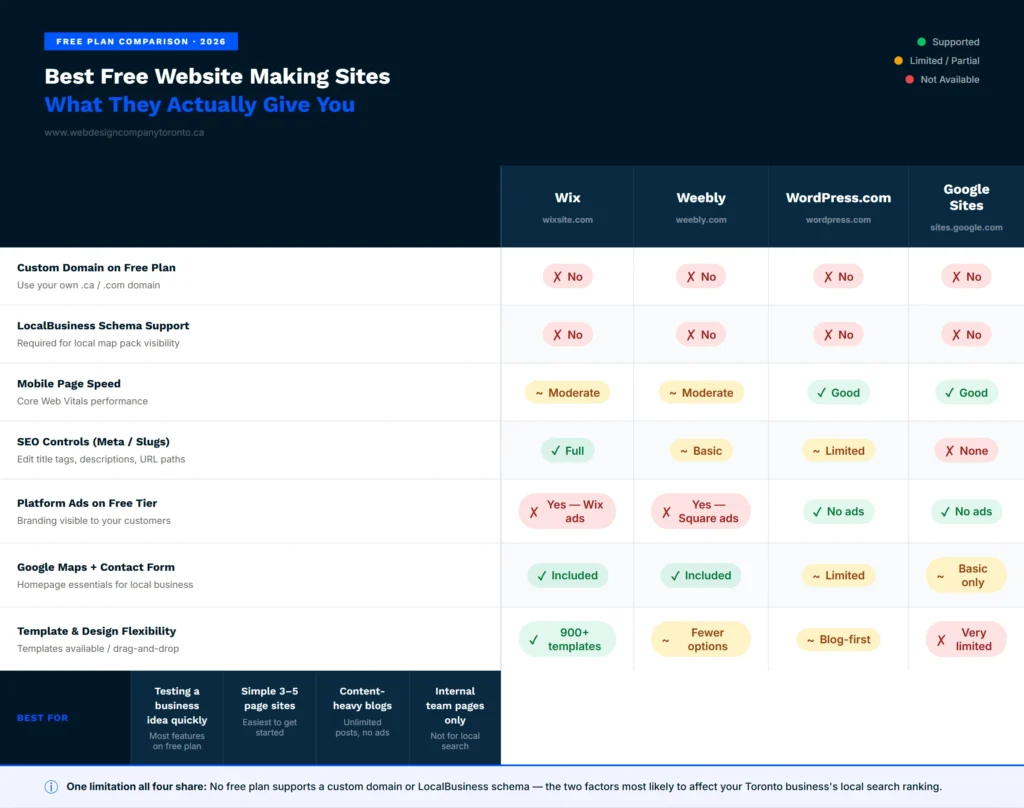
Among the best free website making sites, Wix stands out because it gives you plenty of features without requiring any upfront cost. You can choose from hundreds of templates, use its simple drag and drop editor, get free SSL security, and create a website that works well on mobile devices.
Wix also offers useful SEO settings on its free plan, including the ability to edit page titles and descriptions.
The main drawback is that you cannot use your own domain name. Your website will have a Wix-branded address, and Wix ads will appear on your site. To remove these, you need a paid plan.
You can choose Wix if you want to test a business idea or get online quickly. However, if you want to attract customers through Google and build a stronger online presence, upgrading to a custom domain is a better long-term option.
Weebly — Simpler Free Plan, Fewer Surprises
Weebly, now owned by Square, is a simple website builder designed for people who want to get online quickly. It offers fewer templates and customization options than Wix, but it is easier to use and less overwhelming for beginners.
The free plan includes basic features such as a blog, contact form, and simple SEO settings. Like most free website builders, your site will use a Weebly-branded web address and display Square branding.
Weebly works well for small businesses that only need a basic website with key information and contact details. However, if you plan to expand your site with more pages, content, and features in the future, you may find it limiting.
Wix or Weebly: Which One Is Actually Better?
Wix is the better choice for most Toronto businesses. It has more templates, better SEO controls, and more flexibility at both the free and paid levels.
The Wix or Weebly decision really comes down to one thing: how much do you plan to build? If you are a Toronto photographer who needs a portfolio and a contact page, and that is genuinely it, Weebly’s simplicity is an advantage. You will not get distracted by features you do not need.
If you are a contractor who expects to add a blog, a list of service areas, client testimonials, and before-and-after photos over the next year, Wix gives you the room to do that. Build for where you are going, not just where you are starting.
WordPress.com — Best Free Option for Content-Heavy Sites
Before anything else: WordPress.com and WordPress.org are two completely different things. This confusion trips people up all the time.
WordPress.com is a free hosted service. It is well-suited for blogs. Unlimited posts, reasonable SEO controls, and no ads on your content at the free tier.
What you do not get is a custom domain, full design control, or access to plugins. Your site lives at yourbusiness.wordpress.com until you pay to upgrade.
For a Toronto service business that needs a proper homepage, WordPress.com free is not the right starting point. For a business that primarily publishes articles, guides, or news, it is the most capable free option.
WordPress website design Toronto on a self-hosted WordPress.org build is an entirely different category. That is what web professionals use. Full domain control, full plugin access, full schema support, and page speed you can actually optimize. Those are not the same product.
Google Sites — Only Makes Sense in One Specific Scenario
Google Sites is free with no ads and no upgrade pressure. You get a sites.google.com URL. There are almost no SEO controls and very little design flexibility.
Do not use it as your main business website. It cannot compete in local search. The one case where it makes sense is as a temporary placeholder while your real site gets built, or as an internal page for your team. Beyond that, it is the wrong tool for the job.
The One Problem Every Free Website Builder Has for Toronto Businesses
Most “best free website making sites” reviews are affiliate-driven and avoid discussing limits. This is a neutral, non-affiliated view of the real trade-offs.
There are three problems that every free builder creates for a Toronto local business. None of them is fixed by picking a better template.
Problem 1: Branded Subdomains Can Limit Visibility
Free website builders usually give you a branded web address such as yourbusiness.wixsite.com. While this helps you get online quickly, it can make your business appear less established than competitors using their own domain names. A custom domain is affordable and can help strengthen your online presence.
Problem 2: Limited Access to Local SEO Features
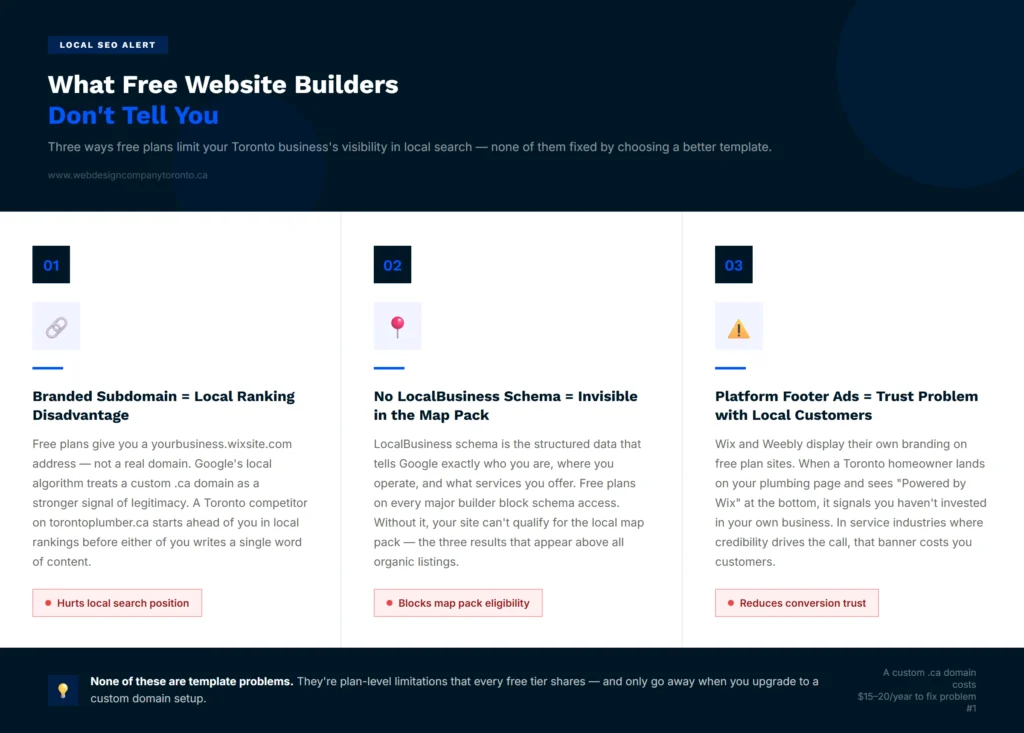
Many free plans restrict advanced SEO options. One important feature is LocalBusiness schema, which helps search engines understand details such as your business name, location, phone number, and services. Without it, your website may have a harder time appearing in local search results.
Problem 3: Branding Can Affect Customer Trust
Free plans often display platform branding on your website. When potential customers see these banners, it can make the business look less professional. For service-based businesses, credibility matters. A clean website with your own domain can help build trust and encourage visitors to stay on your site longer.
These three problems have nothing to do with your template. They are resolved by upgrading your plan or by starting with a professionally built site.
When Should a Toronto Business Upgrade from a Free Website?
You are ready to move to your own domain. A .ca domain costs around $15 to $20 per year and is one of the simplest ways to improve your local search presence. Everything else builds on this foundation.
Use a Professional Email
Using a Gmail address while your website shows a free platform domain can reduce trust. With a custom domain, you can create emails like hello@yourbusiness.ca, which looks more professional to clients.
Improve Local Search Visibility
Ranking for searches like “Toronto personal trainer” or “GTA notary” needs more than basic SEO tools. A custom domain, proper on-page SEO, and LocalBusiness schema work together to improve visibility, which free plans do not fully support.
Build a Better Online Presence
Free website builders offer limited SEO control. They are fine for starting, but not for competing in local search. A custom domain gives you more control and a stronger long-term presence.
Save Time and Focus on Clients
Time spent adjusting templates or fixing a free site is time away from serving clients. Investing in a proper website setup or redesign helps you focus on your business instead of constant website maintenance.
End Note
In the end, you’ve explored the best free website making sites and seen what each one offers. But most free plans share the same limits like branded subdomains, missing schema, and platform ads that can weaken local search performance.
If you’ve realized free tools are not enough for growing a Toronto business, that is where WDCT comes in. We build websites designed for local search from the start, with custom domains, LocalBusiness schema, and Google Business Profile setup.
FAQ
Do free websites show up on Google?
Yes. Wix, Weebly, and WordPress.com sites all get indexed by Google and can show up in search results. The issue is where they land. Free plan sites run on branded subdomains like yourbusiness.wixsite.com, and those addresses tend to rank below custom domains in local searches. A Toronto plumber competing for “plumber near me” on a wixsite.com address is starting behind a competitor on torontoplumber.ca. The domain matters to Google’s local algorithm. Removing that disadvantage costs $15 to $20 per year. That is the smallest investment you can make with the biggest immediate payoff for local visibility.
What is the best free website builder for a small business?
Wix is the best free website making site for most small businesses. The free plan includes 900-plus templates, a drag-and-drop editor, and basic SEO controls including custom meta titles and descriptions. Weebly works better if you need a simple three-page site and want to avoid spending time learning a more complex tool. WordPress.com is the right pick if your business primarily publishes content and the homepage is secondary. All three carry the same core limitation: a branded subdomain on the free plan means you are not on your own domain until you pay. That matters the moment local Google visibility becomes a business goal.
Is Wix or Weebly better for a small business?
Wix is better for most small businesses. More templates, better SEO tools, a larger ecosystem, and more room to grow. The wix or weebly comparison really comes down to how complex you want to go. Weebly makes sense for a business that needs five pages or fewer and wants to get them up without reading documentation. Wix makes sense for a Toronto business that plans to grow the site over time, add content, and wants SEO controls that are actually usable. If you are thinking beyond a single homepage, Wix is the answer.
Can I use a free website for my business permanently?
You can. But it creates friction that compounds over time. Platform ads in your footer tell visitors you are on a free tool. That works against you in industries where credibility matters. The branded subdomain puts a ceiling on how well you rank in local searches. And you cannot set up a professional business email without a custom domain, which means every email you send carries a Gmail or Yahoo address. For a Toronto business where customers find you through Google, the missed visibility from staying on a free plan typically costs more than the $15 to $25 per month that a basic paid plan costs.
Do free website builders hurt SEO?
Free website builders do not block SEO, but they limit how strong your SEO can be. Most free plans use branded subdomains and offer limited control over technical SEO features. This makes it harder to compete in local search against businesses using custom domains and full SEO setup.
When should I switch from a free website to a paid plan?
You should switch once your website is used to attract real customers. If you are relying on Google search, running a local business, or trying to build trust with visitors, a paid plan with a custom domain becomes important. It gives you better SEO control, professional email options, and a more credible online presence.



Build Website With AI: Best Tools & What They Miss
July 19, 2026[…] branding; paid plans start at $17/month. If you specifically want a free build, our comparison of best free website builders covers the free tiers in more […]