






A Toronto business owner looks at a friend’s polished Squarespace website and thinks, “I could probably build something like that myself.” The problem is that a good-looking website and a website that brings in customers from Google are not the same thing. A lot of business owners only notice this after launching a website that gets very little traffic and few leads.
So, how can we build a website that gets Toronto customers? Well, you will get the answer here in this blog. Here, I will talk about six simple steps, the costs you should expect, and the setup work that needs to happen after your site goes live.
You will also get answers to common questions that save time and avoid mistakes. By the end, you will know how to build a website that looks good and helps customers in Toronto find your business.
TLDR Building a website for your business takes a domain ($15/year), a platform (Wix, WordPress, or custom), and five core pages: Home, Services, About, Contact, and Testimonials. The businesses that get Toronto customers from their site also do three things most guides skip: connect Google Search Console, link their Google Business Profile, and add LocalBusiness schema before launch. Without those three, a new website can sit invisible for months, even if it looks professional.
Before You Build: Know What Your Website Needs to Do
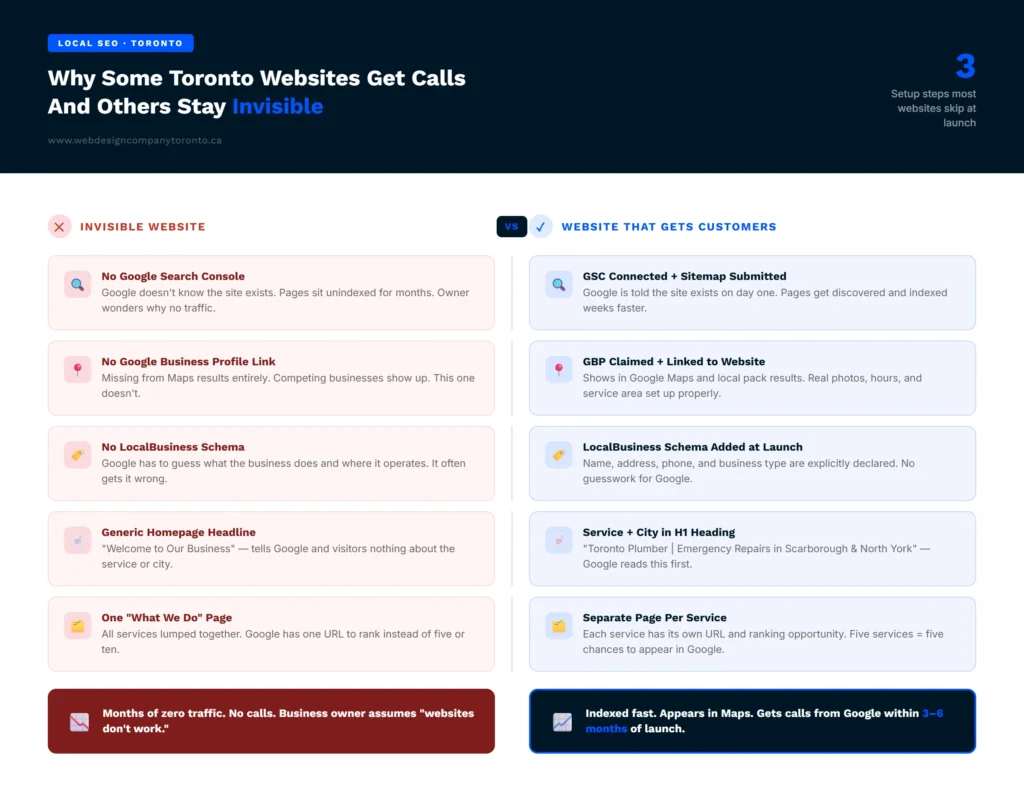
Before choosing colours, fonts, or layouts, take a step back and think about what your website should achieve. The purpose is not simply to have a website. The goal is to get calls, bookings, and new customers.
If you ask ‘how can we build a website’, start by focusing on what your customers need. A business website in Toronto should appear in Google search results, load quickly on mobile devices, and give visitors a reason to trust your business.
Real photos, helpful information, and clear answers can build confidence. When these elements are in place, your website can help turn visitors into customers.
Step-by-Step Process to Build a Website That Gets Toronto Customers
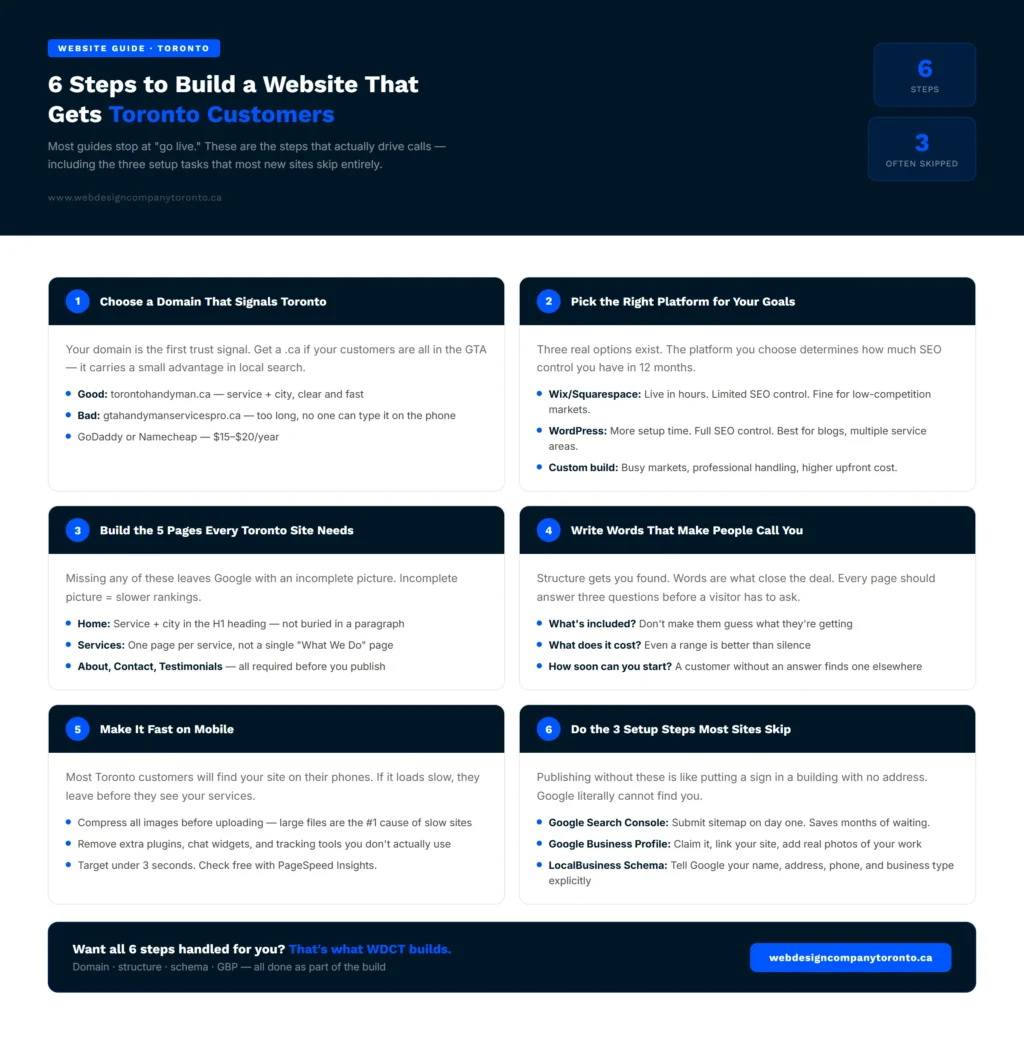
Let’s explore a step-by-step process that you can follow to build a website that gets Toronto customers. So, the process is:
Step 1: Start With a Domain Name That Works for Toronto
How can we build a website that signals trust from the very first moment? It starts with your domain name.
Get a .ca domain if you can. A .ca address tells Canadian visitors they are in the right place. It also carries a small advantage in local search for GTA-based queries. A .com works fine too. But if all your customers are in Toronto, the .ca is the better fit.
Keep the domain short and tied to your business and service. A domain like torontoplumber.ca tells Google what you do and where you do it. A domain like johnsplumbingheating.ca does neither of those things clearly.
Say the domain out loud. If the person on the phone can type it without asking you to spell it, you have a good one. If they ask you to repeat it, pick something shorter.
Bad example: gtahandymanservicespro.ca
Good example: torontohandyman.ca
GoDaddy, Namecheap, and Cloudflare Registrar are popular choices for registering a domain name, usually costing between $15 and $20 per year. Your domain is the foundation of your website. Choose a simple, memorable name before investing in design, hosting, or other website expenses.
Step 2: How Can We Build a Website on the Right Platform?
Three real options exist for a Toronto small business. The platform you choose is one of the most important parts of how can we build a website that works.
Wix or Squarespace:
These two get you live in hours. Monthly plans run $20 to $50 CAD. For a Toronto yoga studio, notary, or florist in a less busy market, this is a reasonable choice. The downside is limited SEO control. In trades, legal, dental, or real estate in Toronto, these platforms often cannot keep pace with professionally built sites after 12 months.
WordPress
It takes more time to set up. The payoff is real control over your SEO structure and site files. If you plan to add blog posts or target multiple service areas, a WordPress build gives you room to grow.
Custom design
It is for businesses where the website is doing serious heavy lifting. If you are in a market full of players with a well-established online presence, a custom site built by professionals is the right answer. You pay more upfront. Everything is handled. You do not maintain it yourself.
There’s also a newer option worth knowing about: AI tools like Wix ADI or Lovable can generate a first draft from a text prompt in minutes. We cover what that actually gets you (and what it still misses) in our guide to how to build website with ai.
Step 3: Build the Pages Your Toronto Customers Actually Expect
Creating a website for your business without these five pages leaves Google with an incomplete picture of who you are. That incomplete picture slows down how fast your site gets found.
Home Page
Your service and your city belong in the main headline. Not buried in a paragraph. Not in the footer. Right at the top in the H1 heading. “Toronto Landscaping Services | Spring Cleanup and Lawn Care” works. “Welcome to Green World” does not. Google reads that heading first to understand what your page is about. Your customer does the same.
Services Page
Give each major service its own page. Do not lump everything into one “What We Do” page. Google treats each URL as an independent ranking opportunity. A plumber who handles both residential and commercial jobs should have two separate pages. Each one can rank for its own search term. One combined page spreads the potential too thin.
About Page
Your real name and your real photo go here. Write a short paragraph about why you started the business. Skip the stock photography. When a customer reads your About page, they are deciding if they trust you enough to call. Give them something genuine.
Contact Page
List your address even if you serve customers at their location. Add your phone number, a contact form, and a Google Map embed. Businesses that leave out the address or skip the map often rank lower in local results.
Testimonials or Reviews Page
Five to eight real quotes from clients, with their first name and Toronto neighbourhood, do more work than any sales copy. Google looks at this page when assessing your credibility. So do your customers before they decide to call.
Now you have the answer to ‘How can we build a website that earns trust from Google and customers at the same time?’ These five pages are the answer. Do not publish without all of them.
Step 4: Write Words That Make People Want to Call You
Knowing how to make a website for business is partly about structure. But the words are what close the deal. This is where how can we build a website?’ becomes ‘how can we build a website that actually earns revenue?’
Your Home Page Headline
Write what you do and where. “Toronto Dentist | Accepting New Patients in North York” tells the reader everything in one line. “Smiling Brighter Together” tells them nothing. Taglines belong in campaigns. Headlines belong on your website.
Your Services Pages
Answer the three questions every customer has before they pick up the phone. What is included? What does it cost? How soon can you start? Even “prices vary by project, call for a free quote” is better than leaving that question unanswered. A customer with no answer will find one somewhere else.
Your About Page
One paragraph. Tell people why you started the business. Not what you do. Why you started. Customers read the About page to decide if the person behind the business is someone they want to deal with.
The Writing Standard to Aim For
Avoid generic claims and use real facts that show what you have done. Specific details build trust and make your business more believable. Focus on helping the reader first, not search engines. That is what makes a website effective and memorable.
Step 5: Mobile Speed Is Important Too
A fast website helps keep visitors on your page. If a site takes too long to load, many people leave before they even see what you offer. You can check your website speed for free with PageSpeed Insights and try to keep loading time under three seconds.
Large images are a common problem. Before uploading photos, compress them to reduce their size. Too many extra features, such as chat widgets, fonts, and tracking tools, can also slow down a website.
If you use WordPress, a caching plugin can help improve speed. Wix and Squarespace handle most technical settings, but you still need to optimize your images. A faster website keeps visitors interested and increases the chance of getting more inquiries and sales.
Step 6: How Can We Build a Website That Google Can Actually Find?
When you create a website for your business and publish it without these three steps, you are putting up a sign in a building with no address.
Set Up Google Search Console
After your website is live, connect it to Google Search Console. Verify that you own the site and submit your sitemap. This tells Google that your website exists and helps it find your pages faster. The setup takes only a few minutes but can save you months of waiting for your site to appear in search results.
Create a Google Business Profile
If you serve local customers, create or claim your Google Business Profile. Add your website, service area, business hours, and real photos of your team and work. This helps your business appear in Google Maps and local search results, where many people look before visiting a website.
Add Local Business Information
Google also needs clear information about your business, including your name, address, phone number, and business type. Many website platforms and SEO plugins make this easy to add. Keeping these details accurate helps Google understand your business and show it to the right people
How Much Does It Cost to Build a Business Website?
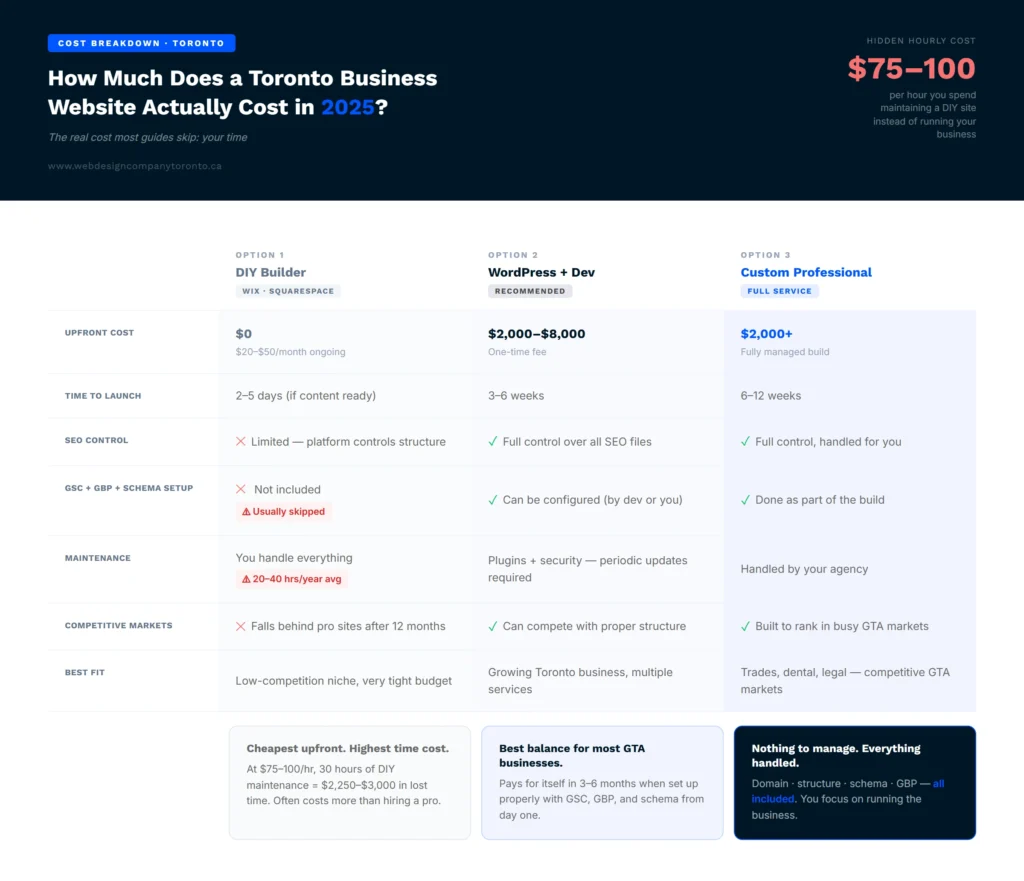
How much a website costs is usually the first thing business owners ask right after figuring out how we can build a website.
A DIY builder costs $15 to $50 per month, plus 20 to 40 hours of your time upfront. WordPress with a developer runs $2,000 to $8,000 as a one-time fee. A custom professional build starts at $2,000 and includes the full Google configuration from Step 6 as part of the build.
The cost most guides skip is your time. Maintaining a DIY site takes ongoing hours. Updates, plugins, speed issues, security patches. If you bill $75 to $100 per hour, those hours add up. Factor that into the real ‘how much does a website cost?’ calculation before assuming DIY is cheaper.
FAQ
How to build a website for business: do it myself or hire someone?
For a Toronto business just getting started, Wix or Squarespace is a reasonable first step. You can be live in a few days for $20 to $50 per month. The gap shows up in search performance. DIY sites miss the technical setup that professional builds include from day one. No custom schema, no optimised site structure, no proper Search Console connection. For a business that needs to show up in Toronto search results, a professionally built site tends to pay for itself within three to six months. Knowing how to build a website for business the right way from the start saves time and money.
How long does it take to build a website for a small business?
A Wix or Squarespace site can go live in two to five days if your content is ready, meaning logo, service descriptions, photos, and contact details are prepared before you start. WordPress with a developer takes three to six weeks.
A fully custom site takes six to twelve weeks. The part that causes most delays is content. Owners who start without it take two to three times longer.
What pages does a small business website need?
When creating a website for your business, start with five pages at minimum. Home, with your service and city in the main heading. Services, one page per service. About, with your real name, photo, and a short personal story. Contact, with address, phone number, a form, and a map.
And a Testimonials or Reviews page with real client quotes. Without all five, Google cannot fully assess your site, which slows down ranking. Toronto service businesses in busy categories typically need eight to twelve pages to rank well. Each service type deserves its own URL.
Can I create a website for my business for free?
Yes. Wix, Weebly, and Google Sites all have free plans. The catch is that free plans put the platform’s name in your URL. That means yourbusiness.wixsite.com instead of yourbusiness.ca. That format limits how well you rank in Google. For a Toronto business that wants to be found through search, a custom domain is worth the $15 to $20 per year it costs.
Most paid plans start at $14 to $25 per month. That is the realistic floor for a site that shows up in Google results. When you decide to create website for your business with the right setup, that small monthly cost is an investment, not an expense. The goal when you create website for your business is to get customers, not just to save money on the build.
Is a Mobile-Friendly Website Really Necessary?
Yes. Most people will visit your website from their phones. If the site is slow, difficult to read, or hard to navigate, they may leave before contacting you. A website that works well on mobile devices helps visitors quickly find what they need, whether that is your phone number, services, location, or contact form. It also creates a better experience and gives people a reason to stay longer.
When Should I Update My Website?
Your website should be updated whenever important information changes. This includes services, business hours, pricing, contact details, or staff information. It is also a good idea to add new reviews, recent projects, or photos from time to time. Small updates help keep your website accurate and useful. They also show potential customers that your business is active and paying attention to details.
End Note
In the end, if you have read through these steps and still feel unsure if your site is set up to bring in Toronto customers, that is a very common place to land.
A good next step is to check what you already have. The Ant Firm’s website audit checklist walks through 10 checks, from local rankings to site speed.