






Quick Answer: Yes, you can build website with AI using tools like Wix ADI, 10Web, Framer AI, Lovable, or Base44. Most let you go from a text prompt to a published site in under an hour, often for free. But the tool only builds the site. It doesn’t guarantee Google can crawl it, that it loads fast, or that it says anything specific enough to convert a visitor into a customer. And fixing that after the fact usually costs more than building it right the first time.
You open an AI website builder just to see what it can do. A few prompts later, your homepage is ready. The layout looks clean, the images fit your business, and everything feels surprisingly polished. In less time than it takes to watch an episode of your favorite show, you have a website.
A few questions come up next. Will people find your website on Google? Will visitors trust it? Will it generate leads or sales? A polished design does not guarantee business results, and that’s where many AI-built websites fall short.
If you want to build website with AI, this guide will help you do it the right way. You’ll see the best AI website builders, how they save you time, and the pieces they can’t handle on their own.
How to Build Website With AI (Step by Step)
When you decide to build website with AI, you need a process. Random tinkering leads to frustration. A clear process leads to results.
Step 1: Choose Your Tool Based on What You’re Building
Every AI website builder does a different job. A marketing site for a contracting business is different from an app that needs user logins and a payment system.
Wix ADI and 10Web work best for small business sites, portfolios, and online stores. They handle the basics well. Lovable and Base44 are better if you need more complex functionality, or if a developer might take over the code later. Framer AI is strongest for design-forward brands like photography portfolios or agencies.
Start here: what does your business actually need? A simple site to answer phone calls and emails? A way to book appointments? A catalog of products? Your answer decides which tool you use. If you’d rather skip AI entirely and follow the full manual process, see our guide on how to build a website.
Step 2: Describe Your Business in Plain Language
The better your prompt, the better your results. This seems obvious, but most people skip it. A good prompt trains your AI website builder well.
Don’t just say “I’m a contractor.” Say “I’m a residential renovation contractor in Toronto who specializes in kitchen and bathroom remodels. My clients are homeowners aged 35 to 65 with budgets from 15k to 100k. I want a website that shows before-and-after photos, explains my process, and makes it easy for people to request a quote.”
Include details about your tone. Are you formal and professional? Friendly and approachable? Use the industry words that matter to your customers. The more specific the prompt, the less generic the output, and generic output doesn’t convert visitors into customers.
Step 3: Iterate Section by Section
Don’t regenerate the entire site because you don’t like one thing. That wastes time and credits. Work section by section instead.
Start by fixing the hero image. Then ask the tool to rewrite the heading. Then adjust the layout of the testimonials. Each small change teaches you how the tool responds to your requests, and you end up with something that actually reflects your business instead of the tool’s default assumptions.
Step 4: Connect a Real Custom Domain
A builder subdomain looks unfinished. “mysite.wixsite.com” tells every visitor the site was built in under an hour. “mysite.ca” tells them you’re a real business.
Connect your custom domain before you share the site with anyone: before you send it to prospects, before it goes on your business cards. This one step makes your site look professional instead of like a personal project.
Step 5: Understand Your Code Options
If you’re comfortable with AI coding tools like Cursor or Claude, you can build website with AI at a deeper level. Instead of using a no-code builder, you have an AI write and edit the actual site code.
This gives you more control. You own the code, and a developer can take over and improve it later. The tradeoff is responsibility. You need to understand what’s being built, test it, and know when something is broken.
For most small business owners, a no-code builder works fine. For technical founders, or anyone with developer support, coding with Claude or Cursor is more powerful. Every step in this process produces “a website.” None of them guarantee it works.
Best AI Website Builders (Wix ADI, 10Web, Framer AI, Lovable)
Plenty of tools claim to be the best AI website builder, but few actually earn it. Here’s an honest look at the four worth considering.
Wix ADI
Wix ADI is the easiest starting point for a simple business site. You answer questions in a chatbot, and Wix suggests a design. The design looks clean, the site works, and the drag-and-drop editor is genuinely good.
The limit shows up when you want anything custom. Wix’s templates are solid but rigid. If your vision doesn’t fit a template, Wix won’t stretch that far. After the initial AI setup, you’re working in their builder like you would with any other website builder. The starting price is free with Wix branding; paid plans start at $17/month. If you specifically want a free build, our comparison of best free website builders covers the free tiers in more depth.
10Web
10Web builds on real WordPress underneath. That matters. WordPress already has thousands of themes and plugins built by the community, and if you ever hire a developer to take over, they’ll already know WordPress.
10Web’s AI helps you build faster, but you’re still building a WordPress site. The setup is smoother than managing WordPress yourself, but there’s no special lock-in environment. The site is portable. This is the choice if you think you might eventually hire someone to improve the site. WordPress developers exist everywhere in Toronto and beyond.
Framer AI
Framer AI produces the best-looking output of the group. If you’re a photographer, designer, or creative professional, Framer makes your work look stunning: modern designs, thoughtful layouts.
The catch is in finishing. Framer gives you a great wireframe and design mockup, but actually filling it with your content and making it fully functional takes work. It’s less “publish in an hour” and more “get a head start on a design.” For a contractor who just wants a site that brings in calls, Framer might be overkill.
Lovable
Lovable generates real, exportable React and TypeScript code with a Supabase backend database. It’s the most powerful option here, and also the most technical to finish properly.
If you build website with AI using Lovable and then hand the code to a developer for refinement, you get the best of both worlds: a working prototype fast, and a developer who can make it production-ready. If you’re alone and not technical, Lovable’s power becomes a burden: you’ll end up publishing something that looks finished but has hidden technical problems. SEO suffers, page speed suffers, security might suffer.
None of these four tools ship with SEO built in by default. That comes later, and it’s the real work.
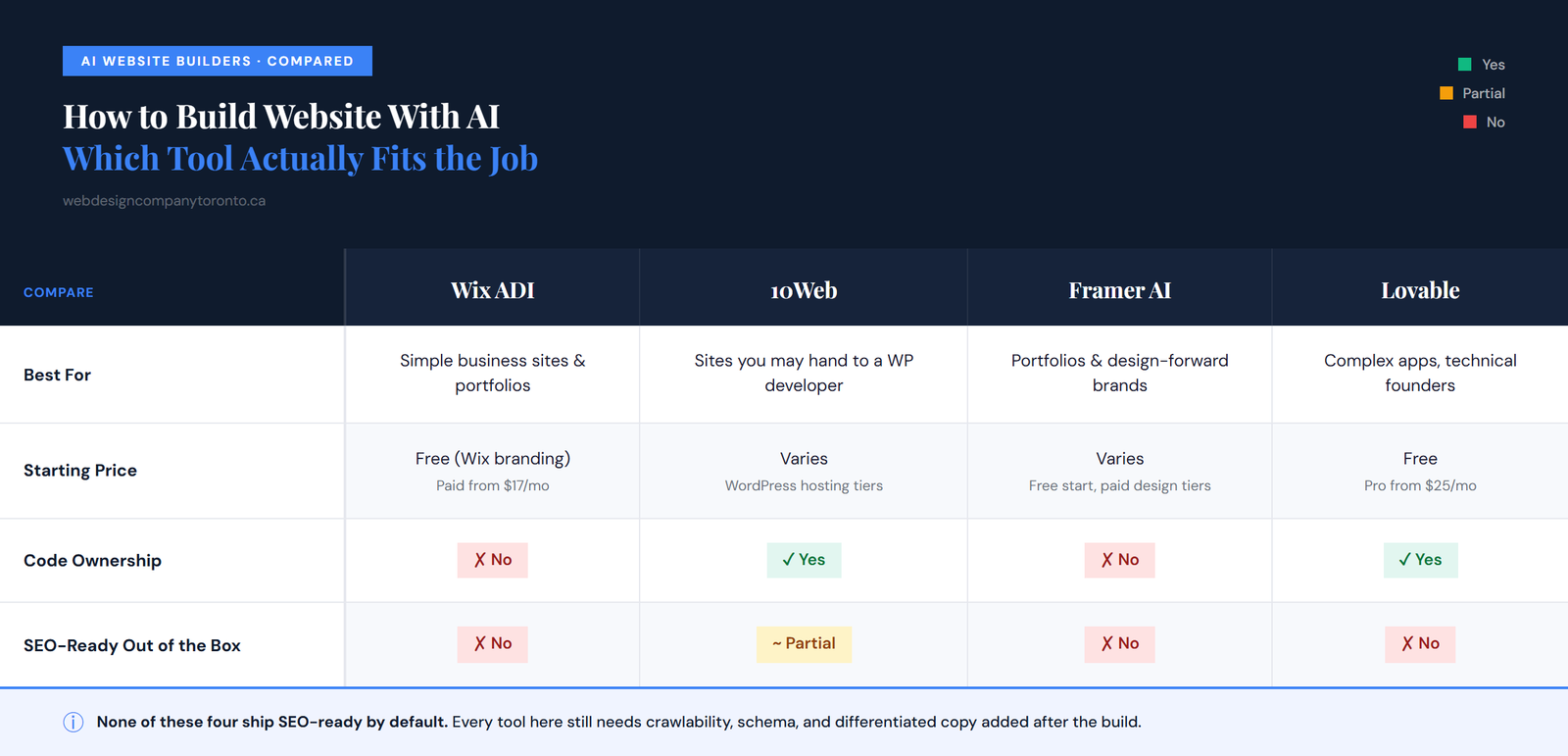
Lovable Pricing
Lovable pricing runs on a credit system rather than a flat monthly fee. The free tier gives you 5 credits per day, enough to test the tool and see if you like how it works.
The Pro plan is $25/month. You get 100 monthly credits that carry over, a custom domain, and code editing. If you’re building a real business website, Pro is the realistic choice. Free works for playing around.
The Business plan is $50/month and adds team permissions and single sign-on. You only need this if multiple people are building and publishing.
The honest truth: credits burn faster than expected. One round of changes might use 3 to 5 credits, and if you’re actively iterating, you’ll hit Pro’s limits regularly. Budget for Pro from the start if this is for a real business.
Base44 vs Lovable
Base44 vs Lovable comes down to one question: do you want to own your code? Both tools let you build website with AI quickly, but the differences matter for your long-term plans.
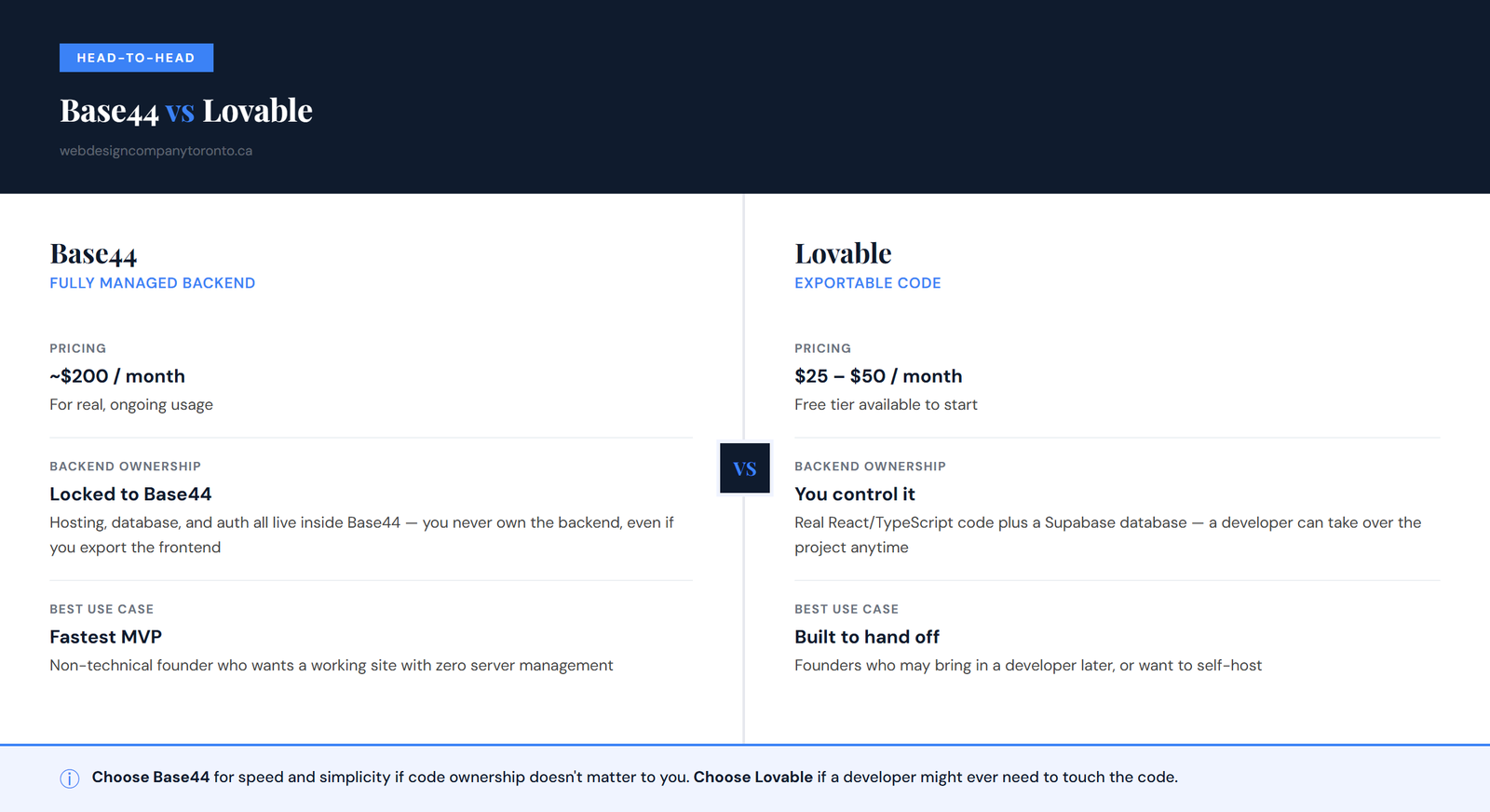
Base44 is a fully managed, all-in-one backend. Hosting lives inside Base44. Your database lives inside Base44. Your authentication system lives inside Base44. You never own the backend. If you export the frontend later, the backend stays locked to Base44. This is fastest for a non-technical founder: you build the site, it works, no server headaches, no database management. You’ll pay around $200/month for real usage, but the setup is painless.
Lovable generates real, exportable React code. You control the code, you can take it to any hosting provider, and you control the Supabase database. A developer who understands React can pick up your project and improve it. You’ll pay $25 to $50/month to start.
The recommendation is simple: choose Base44 if you never want to think about code or ownership, and you just want a site that works and updates through their interface. Choose Lovable if you want the option to hand this to a developer later, or to host it yourself. For small businesses in Toronto, Lovable tends to make more sense. Developers are available, and if your needs grow, you’ll want to own your code.
Building a Website With AI vs. Building One That Actually Works
Publishing a website is easy. Getting people to find it on Google is the hard part, and reaching the right audience takes extra effort beyond what any builder does automatically.
Most AI website builders focus on design and functionality. They create websites that look good and are easy to use, but that doesn’t always mean the site is ready for search engines. Things like SEO, page speed, and useful content still need attention.
Lovable and Base44 usually build React single-page websites. These work well for visitors, but Google may not read all of the content unless the site is set up properly, which can make it harder for your pages to appear in search results. Google’s own documentation on JavaScript SEO is explicit that client-rendered content needs extra work before Googlebot can reliably process it. It isn’t guaranteed out of the box.
Wix ADI and Framer AI do a better job with search indexing because they use more traditional website builders. Even so, the content is often too generic. It may sound fine, but it doesn’t explain the business clearly enough to attract search traffic.
10Web is built on WordPress, which is already search-engine friendly. Still, the AI-written content usually needs editing to make it more useful and specific.
Many small business owners spend a weekend building a website and pay around $25 to $50 a month for the platform. The site goes live, but very few people visit it from Google. After a few months, they often end up paying for a full rebuild with better content and SEO, usually at a higher cost than if they’d budgeted for it the first time. If you’re weighing that tradeoff, our breakdown of how much do websites cost is a useful starting point.
What AI Website Builders Don’t Tell You Before You Publish
Before you publish, run through this checklist. These are the gaps AI website builders don’t mention.
Generic Content
AI website builders often create content that sounds similar across different websites. Phrases like “quality service,” “trusted team,” or “years of experience” are common, but they don’t explain why someone should choose your business.
Specific content works better. Mention the services you offer, your pricing, your service area, or the type of customers you help. These details help visitors understand what makes your business a good fit.
Missing Local Business Schema
Local business schema is code that helps Google understand your business information: name, address, phone number, and hours. It can improve your visibility in local search results, and AI website builders don’t always add it automatically. In those cases, it needs to be added manually after the site is published.
Website Updates After the Trial
AI website builders often include free credits or a trial period. After it ends, editing your website may require a paid plan. Before choosing a platform, check how updates work after the trial. Your website should stay easy to edit as your business grows and changes.
Slow Mobile Performance
People visit websites from their phones every day. If your website takes too long to load, visitors may leave before reading your content, and slow-loading pages can also affect search rankings. Test your website on a mobile phone before publishing. A few extra minutes of testing can help you catch problems early. For a deeper look at what this actually costs to fix properly, see our guide on seo cost for small businesses.
FAQ
Can I build a website with AI for free?
Yes. Wix ADI, Framer AI, and Lovable’s free tier all let you build website with AI at no cost to start, though free plans usually cap you on custom domains, credits, or how much you can customize before you need to upgrade. Free is enough to test whether the tool fits how you want your site to look and work.
Will a website built with AI rank on Google?
Not automatically. AI website builders focus on getting a site published, not on whether Google can crawl it, index it, or rank it above competitors. Tools that generate React-based apps (like Lovable or Base44) can ship without server-rendered content, generic copy, or business schema, all of which hold a site back in search regardless of how good it looks.
What’s the difference between Base44 and Lovable?
Base44 is a fully managed, all-in-one platform: hosting, database, and backend all live inside Base44 itself, which is fastest for a non-technical founder but means you never fully own the backend. Lovable generates real, exportable React and TypeScript code with a Supabase database you control, which matters if a developer might ever need to take over the project.
How much does Lovable cost?
Lovable’s free plan gives you 5 credits a day, enough to try the idea. The Pro plan is $25/month for 100 monthly credits that roll over, a custom domain, and code editing access. Business is $50/month and adds SSO and team permissions. Lovable pricing runs on a credit system, so cost scales with how much you’re actively building and changing, not a flat monthly fee for a finished site.
AI makes it easy to build website with AI and get something online in less time than ever. But going live is only the first step. It also needs useful content, good SEO, fast-loading pages, and the right setup so Google can actually find and rank it.
If you’ve already built something with AI and it’s not showing up anywhere, you don’t need to start over from scratch. You need the layer underneath fixed. The Ant Firm’s guide on why a website doesn’t show up on Google walks through the 10 most common reasons.