






TLDR
To respond to a Google review, go to your Google Business Profile, click Reviews, find the review, and click Reply. But what you write matters just as much as the act of responding. Here is exactly what to say for positive, negative, and neutral reviews.
Introduction
A Toronto dental clinic has 47 Google reviews but has replied to only three. Their competitor nearby responds to every review within a day. It is easy to see which business looks more reliable to Google and to potential customers.
Learning how to reply to Google reviews is one of the simplest local SEO boosts available. It costs nothing and builds trust with every reply.
Yet many Toronto businesses ignore their reviews or post the same copy-and-paste response. Both choices quietly weaken their visibility and make competitors look more engaged and more dependable.
In this blog, I will talk about how to respond to Google reviews, reasons to answer them and examples of responding to good and negative reviews.
Let’s begin.
Why Responding to Google Reviews Affects Your Local Rankings
Many are searching for simple, low-cost ways to compete, and this is one of them. Responding to reviews costs nothing. According to BrightLocal’s 2026 Consumer Review Survey, 89% of consumers expect a business to reply to reviews. That expectation alone makes ignoring your reviews a missed opportunity.
Let’s see why responding to Google reviews affects your local rankings:
Google Sees Engagement as a Trust Signal
When a business consistently replies to reviews, it shows ongoing activity. Google treats this as a sign that the business is operational and paying attention to customers, which can support stronger local credibility.
Review Responses Add Local Context
Including natural references to your service area or work in replies helps reinforce where you operate. Phrases like mentioning a city or neighbourhood can quietly strengthen local relevance in search.
More Activity Improves Profile Visibility
Regular responses keep your Google Business Profile active. This ongoing engagement helps your listing stay relevant compared to inactive profiles that rarely update or interact.
Better Customer Experience Supports Rankings Indirectly
Replying to reviews also improves customer trust. When people see active responses, they are more likely to engage with your business, which can indirectly support stronger local performance over time.
How to Respond to Positive Google Reviews (With Examples)
A five-star review is your best marketing moment. Most owners write “Thanks so much!” and move on. Knowing how to respond to Google reviews in the positive category the right way means you treat each reply as an invitation for every future reader to imagine themselves having that same experience.
Rules for positive review responses:
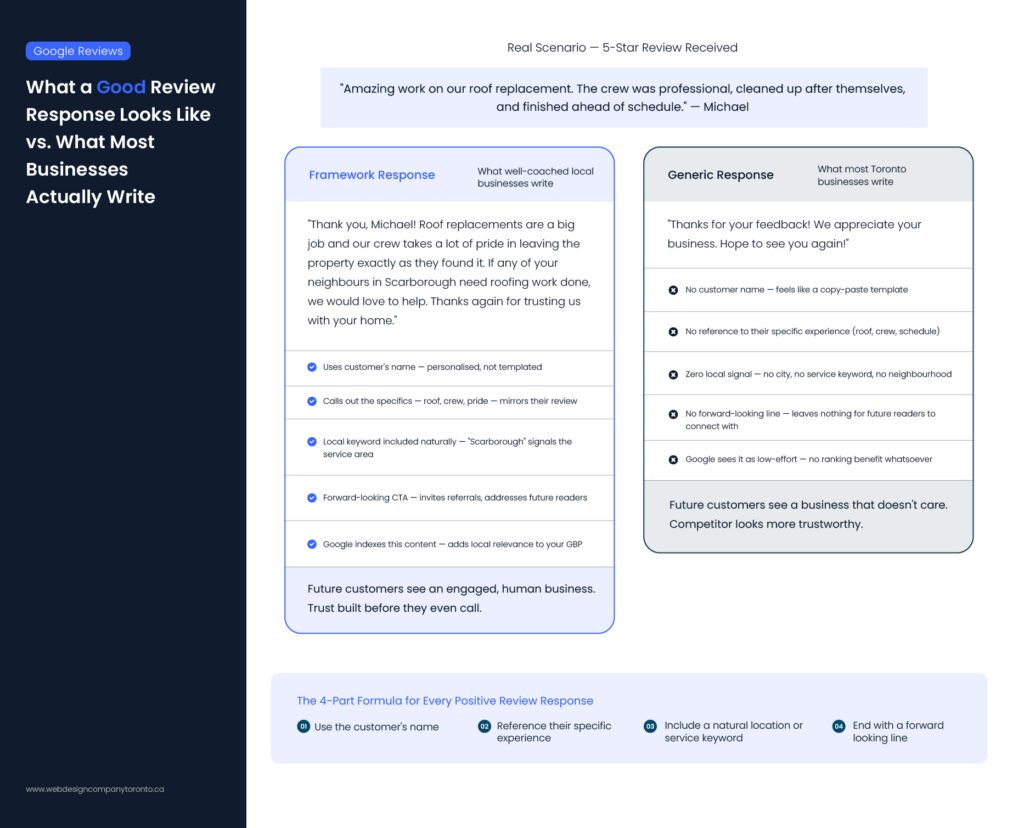
Use the customer’s name. Reference something specific from their review. Include a natural location or service keyword where it fits. End with a forward-looking line.
Example 1: Trades Business (Plumber or Roofer)
Customer Review: “Amazing work on our roof replacement. The crew was professional, cleaned up after themselves, and finished ahead of schedule.”
Response: “Thank you, Michael! Roof replacements are a big job and our crew takes a lot of pride in leaving the property exactly as they found it. If any of your neighbours in Scarborough need roofing work done, we would love to help. Thanks again for trusting us with your home.”
Example 2: Professional Service (Dental Clinic or Accountant)
Customer Review: “Dr. Chen and her team made me feel completely at ease. First time I have ever left a dental appointment without feeling stressed.”
Response: “Thank you so much, Sandra! We hear from a lot of patients that dental visits feel stressful, so creating a calm experience is something our whole team focuses on. We are glad it showed. We look forward to seeing you at your next visit.”
Example 3: Home Cleaning Service
Customer Review: “The cleaning team did an incredible job. My apartment has never looked this spotless before.”
Response: “Thank you, Ayesha! Our team puts a lot of care into making sure every corner is handled properly, especially in apartments where details matter most. If you ever need regular cleaning in Downtown Toronto, we would be happy to help again.”
Example 4: Restaurant or Café
Customer Review: “Great food and really friendly staff. The atmosphere was warm and relaxing.”
Response: “Thank you, Daniel! We are glad you enjoyed both the food and the atmosphere, that balance is exactly what we aim for. If you are ever back in the area, we would love to welcome you again for another visit.”
Example 5: Fitness or Gym
Customer Review: “Best gym experience I have had. Trainers are supportive and the environment is very motivating.”
Response: “Thank you, Priya! Our trainers work hard to create a supportive space where people actually enjoy training. We are really happy it made a difference for you. See you at your next session.”
Copy-Paste Template for Positive Reviews
“Thank you, [Name]! We really appreciate you sharing this. [Reference their specific experience in one sentence.] If you ever need [your service] again or want to refer a friend in [neighbourhood], we would love to help. Thanks for choosing us.”
How to Respond to Negative Google Reviews (With Examples)

A one-star review, handled well, is watched by more people than almost any marketing you will run. They want to see what went wrong. More importantly, they want to see how you handled it.
Here is a five-step framework for how to respond to negative Google reviews every time.
Step 1: Wait 30 minutes. Never reply when you are frustrated. A defensive response is permanent and public.
Step 2: Acknowledge the experience. You do not have to agree with everything they said. You need to show you heard them.
Step 3: Apologize for the experience, not the facts. “I am sorry you had this experience” is different from “I am sorry we made a mistake.” One acknowledges feelings. The other admits liability.
Step 4: Take it offline. Include your email or phone number in the response. This shows future readers you are willing to make things right privately.
Step 5: Keep it short. A long response signals that you are trying to win an argument. You are not. You are trying to show future customers you care.
Example 1: A Valid Complaint
Customer Review: “Waited over an hour past my appointment time with no explanation. Staff seemed unbothered. I will not be coming back.”
Response: “Hi David, thank you for telling us. Waiting that long with no communication is not acceptable and we are sorry it happened. Please reach out at [email or phone]. We would like to make this right and we understand if you choose not to return.”
Example 2: A Fake or Unfair Review
When a review comes in and you have no record of that customer, respond calmly and flag it in Google Business Profile for removal. Do not accuse them directly.
Customer Review: “Terrible service. The owner was rude and the place was a mess.”
Response: “Hi, we have gone through our records and cannot find any visit that matches this description. We take all feedback seriously and would genuinely like to understand what happened. Please reach out at [email or phone]. We are happy to talk.”
Example 3: Service Delay Issue (Restaurant or Café)
Customer Review: “Food took way too long and arrived cold. Really disappointing experience.”
Response: “Hi Emma, thank you for sharing this. We are sorry your order took longer than expected and arrived in that condition. That is not the standard we aim for. Please contact us at [contact info] so we can look into what happened and make it right.”
Example 4: Poor Communication (Home Service Business)
Customer Review: “Booked a service but no one showed up and no one called to explain.”
Response: “Hi Mark, we are really sorry for the missed appointment and lack of communication. That should not have happened. Please reach out to us at [contact info] so we can review this and ensure it does not happen again.”
Example 5: Price Complaint (Professional Service)
Customer Review: “Way too expensive for what was offered. Felt overcharged.”
Response: “Hi Sarah, thank you for your feedback. We are sorry the pricing did not match your expectations. We always aim to be clear about costs upfront, and we would be happy to go over your concerns if you contact us at [email or phone].”
Copy-Paste Template for Negative Reviews
“Hi [Name], thank you for letting us know. We are sorry you had this experience. Please reach out at [email or phone] so we can make this right. We appreciate your feedback.”
How to Respond to Neutral (3 to 4 Star) Reviews
Most businesses panic over one-star reviews and ignore three-star reviews. That is backwards.
A three-star reviewer is not angry. They are on the fence. They liked you enough to stay but not enough to return on their own. Knowing how to respond to Google reviews at the neutral level is where businesses leave real money on the table. One well-written response can tip a fence-sitter into a loyal repeat customer.
Mastering how to respond to Google reviews for this group is simpler than most people expect. You are not managing a crisis. You are just showing someone you noticed and that you care enough to do better.
Example: A Three-Star Review
Customer Review: “Food was good but service felt rushed and the wait was longer than expected for a Tuesday. Might try again sometime.”
Response: “Thank you for coming in and for the honest feedback, Jamie. You are right that a Tuesday visit should feel a lot more relaxed than what you experienced. We have been adjusting our floor coverage and this tells us we are not quite there yet.”
Copy-Paste Template for Neutral Reviews
“Thank you for sharing this, [Name]. We are glad [positive part of their experience] but we hear you on [the issue]. That is something we are actively working on. We hope you will give us another shot.”
FAQ
How do you respond to Google reviews as a business?
To respond to a Google review, sign in to your Google Business Profile, open the Reviews section, find the review, and click Reply. Use the customer’s name if possible and mention what they experienced. For negative reviews, stay calm and invite them to continue the conversation privately. Every reply should be written with future customers in mind, not just the person who left the review.
Should you respond to all Google reviews?
Yes, it is best to respond to every review, both positive and negative. Research from BrightLocal shows that most customers prefer businesses that reply to all feedback. If you are short on time, start with negative reviews first, then work through the rest. Regular replies also show Google that your business is active.
Do Google review responses help SEO?
Yes. Google uses review activity as a sign of engagement. When you respond regularly, it shows that your business is active and trustworthy. Your replies are also indexed, so mentioning your service or location naturally can support local visibility. This is especially helpful for local searches where competition is high
How long should a Google review response be?
A good response is usually 2 to 4 sentences. It should be long enough to acknowledge the customer and short enough to stay natural. Avoid overexplaining or sounding scripted.
What should you avoid when replying to reviews?
Do not argue, blame the customer, or use overly formal templates. Avoid copying the same response for every review. Keep it human, direct, and specific to what the customer said.
Can Google remove fake reviews?
Yes, but only if they break Google’s policies. You can flag suspicious reviews in your Google Business Profile. Google will review them, but removal is not guaranteed. It is still important to respond calmly in case they stay visible.
How often should you reply to Google reviews?
Try to respond within a few days of receiving a review. Faster replies show that your business is active and attentive, but consistency matters more than speed.
Who should respond to Google reviews in a business?
Ideally, the business owner or a trained staff member should handle responses. This ensures replies feel personal and match the tone of the brand.
End Note
Finally, your Google Business Profile and your website should work together if you want better local results. Responding to Google reviews is only one part of it. If your website does not match what people see on your GBP, you can lose customers before they contact you.
A good website supports your reviews and local signals so everything feels clear and trustworthy. If you want better local visibility, you need both working together. For the profile side, The Ant Firm’s guide to Google Business Profile optimization covers categories, services, photos and posts.